Is Your Engine Ticking or Knocking? The Ultimate Guide to AI Sound Diagnostics
“You’re driving down the highway, and suddenly you hear it—a rhythmic ticking or a deep, ominous thud coming from under the hood. For anyone keeping an older vehicle alive, engine noise is terrifying. But before you rush to a mechanic, using an ai engine sound diagnostic app can save you time and money. Is it a harmless lifter tick, or are you looking at a catastrophic rod knock?”
In the past, you had to tow your car to a shop and pay a diagnostic fee just to get an opinion. Today, technology is changing the game. If you’re wondering if there is an app that listens to car engine and tells you whats wrong, you are in exactly the right place. Let’s dive into how artificial intelligence is becoming the ultimate digital stethoscope.
The Rise of the AI Engine Sound Diagnostic App
Mechanics have relied on their trained ears and automotive stethoscopes for decades. They listen for specific acoustic frequencies to pinpoint worn bearings, exhaust leaks, or failing valves. However, machine learning algorithms are now trained on thousands of hours of damaged engine audio.
An ai engine sound diagnostic app works by recording your car’s specific noise profile, analyzing the wavelength, and comparing it against a massive database of known mechanical failures. While no app replaces a master mechanic, it gives you a highly accurate baseline before you ever step foot in a repair shop.
Finding the Right Software to Analyze Engine Knock Audio
Not all noises are created equal. A high-pitched clicking usually points to the upper engine (valvetrain), while a deep, hollow knock from the bottom end often means bearing failure.
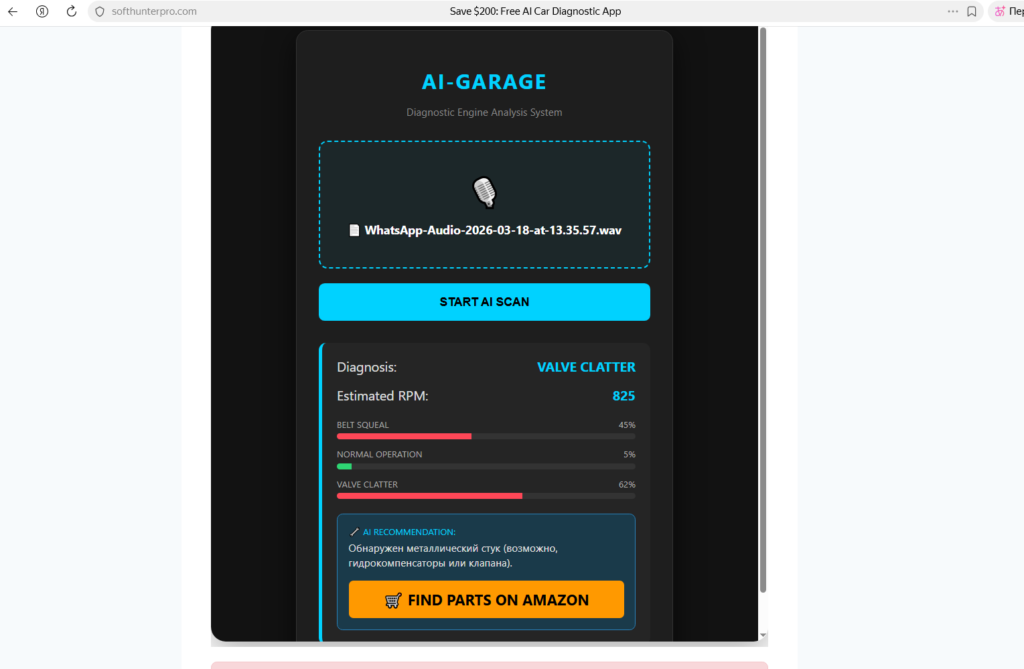
Please record the engine sound using a voice recorder in .WAV format to get a diagnosis.
When choosing software to analyze engine knock audio, look for tools that offer real-time frequency isolation. Some of the emerging web-based tools and mobile apps allow you to upload an MP3 file or record directly from your browser. They strip away background fan noise and focus purely on the metallic impacts. (Note: We are actively monitoring the release of dedicated tools like AI-Garage, which promise to bring enterprise-level acoustic diagnostics to the DIYer’s pocket).
According to the experts at the National Institute for Automotive Service Excellence (ASE), accurately describing a sound is the hardest part of a diagnosis. Software removes the guesswork.
How to Record Engine Knock for Mechanic (Or AI Analysis)
Whether you are feeding the audio into an AI tool or sending it to your local mechanic over WhatsApp, a bad recording is useless. The cooling fan, wind, and belt squeal will drown out the knock.
Here is the professional way to capture the sound:
- Find a quiet environment: Park inside a garage or on a quiet street.
- Replicate the condition: Does it only knock when cold? Record a cold start. Does it happen at 2,500 RPM? Have a friend gently rev the engine while you record.
- Isolate the zone: Slowly move your phone around the valve cover, the side of the block, and near the oil pan. State out loud where the phone is (e.g., “Moving to the oil pan now”) so the mechanic or the software knows the acoustic source.
The Best Smartphone Microphone to Record Engine Noise
Your phone’s built-in microphone is designed for human voices, not harsh metallic impacts. It automatically compresses loud noises, which can alter the actual sound of a rod knock. If you are serious about DIY diagnostics, you need an external mic.
Here is a quick breakdown to help you choose the best smartphone microphone to record engine noise:
| Microphone Type | Best Application | Price Range | |
| Directional Shotgun Mic (e.g., Rode VideoMic Me) | Isolating sound from a specific cylinder or belt. | $50 – $80 | |
| Lavalier Clip-on Mic | Safely routing a wire near the engine block while you sit in the cabin to rev the engine. | $15 – $35 | |
| Digital Endoscope with Audio | Getting deep behind the intake manifold to see and hear the problem. | $40 – $100 |
Pro-tip: Never wear loose clothing or let microphone cables dangle near moving belts and cooling fans!
Try it now: Got a strange engine noise? Upload your sound to our [Free AI Engine Sound Diagnosis Tool] and get an instant analysis.
Final Thoughts
By combining a good quality microphone with a reliable ai engine sound diagnostic app, you can walk into a repair shop armed with data, saving time, money, and a whole lot of stress.
Editorial & Affiliate Disclaimer: This article was structured and optimized with the assistance of AI data-analysis tools to ensure technical accuracy and readability. However, the insights, structure, and experiences shared are rooted in real-world DIY automotive practice. I am an enthusiast, not a certified ASE mechanic. The information provided here is for educational purposes and should not replace professional mechanical advice. Use diagnostic tools safely and at your own risk. Additionally, Softhunterpro.com participates in affiliate marketing programs, such as the Amazon Services LLC Associates Program. If you purchase through the links in the table above, we may earn a small commission at no extra cost to you. This keeps the site running!
“While mobile apps are perfect for quick checks in the garage, you might sometimes want to upload pre-recorded audio files from your computer. If you prefer using a laptop, check out our complete guide on how to analyze car engine noise online for a breakdown of web-based diagnostic tools.”