How to Start a Faceless YouTube Channel with AI in 2026 (From $0 to $10k)
Want to learn how to start a faceless youtube channel with ai?
You don’t need a studio. You don’t need a camera. You don’t even need to show your face.
If you have a laptop (or even just a phone), you can build a faceless YouTube channel using free AI tools—and start uploading videos this week.
And yes… YouTube Automation is basically the modern gold rush. The creators who win aren’t always the most talented. They’re the most consistent. They publish. They learn. They repeat.
In this guide, you’ll get two paths:
- The FREE way (manual, takes time, costs $0)
- The FAST way (still beginner-friendly, but built for speed)
You’ll also get a complete tool review, a step-by-step tutorial, and a clear plan to publish your first video today.
Let’s build your cash cow channel.
The Big Opportunity (and what “YouTube Automation” really means)
Before tools… you need a mindset reset.
YouTube automation ai meaning (simple version):
It’s not “press a button and get rich.” It’s building a repeatable system where AI handles the boring parts (drafting scripts, voiceover, visuals, captions), while you handle the strategy (topic selection, packaging, quality control).
AI can do 90% of the production workflow, but the channel still needs a human brain to:
- pick the right niche,
- write with a hook,
- avoid “reused content” vibes,
- and publish consistently.
That’s the game.
How to start a faceless youtube channel with ai
Here’s the blueprint used by most successful faceless channels. It’s simple. It’s scalable. It works.
The Faceless AI Workflow (5 steps)
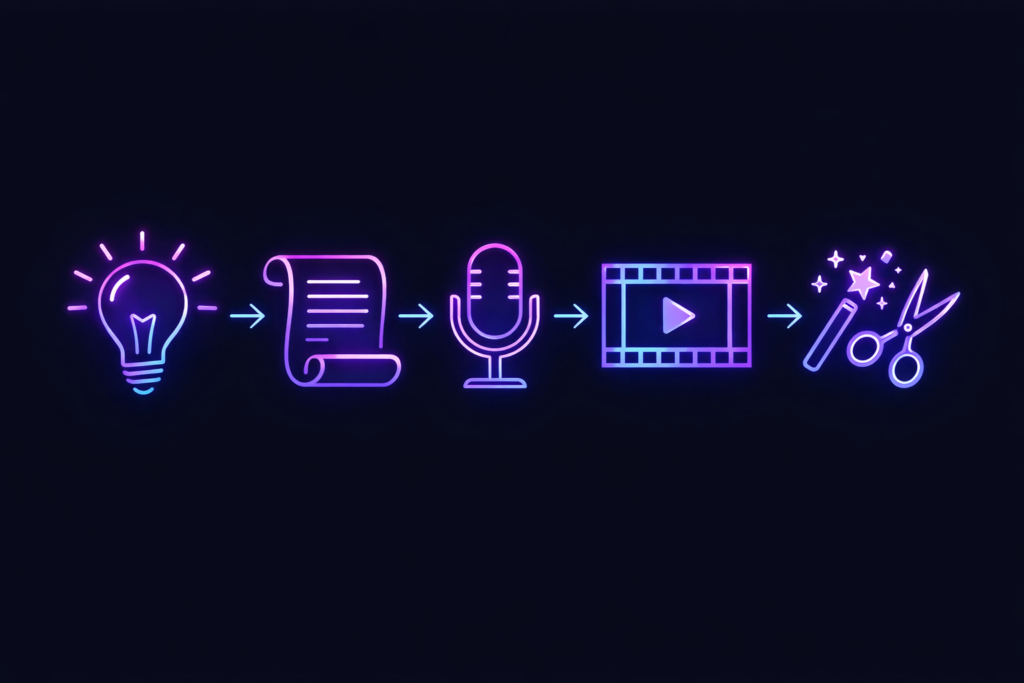
1) Idea → Find topics people already watch
2) Script → Turn the idea into a tight, engaging story
3) Voice → Generate a clean AI narration
4) Visuals → Add stock clips, images, or AI-generated scenes
5) Edit → Assemble + captions + music + pacing
That’s it.
Why this is perfect for beginners with $0
Because you can start with:
- free scriptwriting (ChatGPT free)
- free voice (CapCut TTS or limited tiers)
- free visuals (stock libraries)
- free editing (CapCut)
No face. No mic. No camera. No excuses.
What niche should you pick?
Start with niches that work well without a personality on screen:
- Scary stories / mysteries
- Motivation / quotes / life lessons
- Facts / “Top 10” / history
- Finance basics (educational, not advice)
- Celeb stories (be careful with claims, cite sources)
- Productivity / self-improvement
- Relaxation / ambience (harder to monetize if too repetitive)
Beginner rule: pick a niche where you can make 30 videos without running out of ideas.
Best free ai for youtube automation
This is the section you came for.
Below is the $0 stack for creating faceless videos. I’ll be honest about what’s truly “free,” what’s limited, and what slows you down.
1) Script Tool (Free): ChatGPT (Free plan)
Use for:
- video script outlines
- hooks + retention writing
- punchy narration
- title + description + tags
Best way to prompt (copy/paste):
“Write a 900-word YouTube script in a suspenseful style. Use short sentences. Add pattern interrupts every 20–30 seconds. Include a hook in the first 10 seconds. Topic: ____.”
Pros: Fast brainstorming, great for outlines.
Cons: Needs human editing for accuracy.
2) Voice (Free tier options): ElevenLabs OR CapCut
Option A: ElevenLabs (Free tier)
ElevenLabs offers 10,000 characters/month free for personal projects. Note: Commercial use isn’t included on the free plan.
- Pros: Very natural voices.
- Cons: Free tier is limited.
Option B: CapCut Text-to-Speech (Free)
CapCut includes a built-in text-to-speech tool inside its editor.
- Pros: Super convenient (voice + editing in one place).
- Cons: Voices can sound more “AI-ish”.
3) Visuals (Free): Pexels / Pixabay OR Leonardo.ai
Option A: Pexels & Pixabay (Stock Footage)
Use these for background b-roll, cinematic shots, and “mood” clips. Most content is free for commercial use (always check the specific license).
Option B: Leonardo.ai (Free image generation)
Leonardo offers a free tier with a daily token quota. This is where “text to video ai” starts—generate custom scene images (characters, eerie environments), then animate them in editing.
4) Editing (Free): CapCut (Desktop/Mobile)
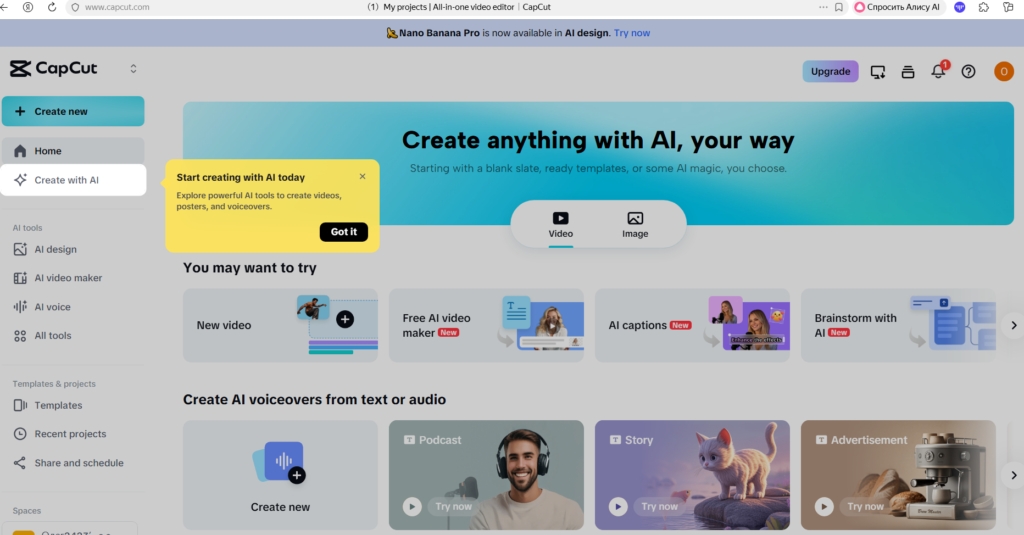
CapCut is the beginner king.
Reality check: Using separate free tools (script → voice → visuals → edit) usually takes 4–5 hours per video. That’s normal. Don’t quit.
The “Pro” Automation Upgrade (15-minute videos)
Let’s be real. If you want speed (and consistency), eventually you’ll want one tool that does everything.
InVideo AI (One-click creation)
InVideo AI is the ultimate “All-in-One” generator. It writes scripts, adds clips, generates voiceovers, and edits the video for you.
(Note: If you want to see how InVideo compares to other tools for ads, check our guide on the : 7 Best AI Video Generators).
Best for: Fast drafts, storytelling formats, consistent uploads.
Fliki (Great for list videos)
Fliki is a solid “blog-to-video” tool. It’s perfect if you prefer more control over specific scenes and listicles (“Top 10…”).
Step-by-Step Tutorial: Make Your First Faceless Video
We’re going to build a simple video in the “Scary Stories” niche.
Goal: Upload your first video today.
Step 1: Pick a topic
Search YouTube for “scary story true” or “creepy story narrator”. Look for videos with high views. Model their format (don’t copy).
Step 2: Generate script
Ask ChatGPT: “Write a 1,000-word YouTube narration script for a faceless scary story channel. Hook in the first 10 seconds. Add tension every 30 seconds.”
Step 3: Create voice & Visuals
Use CapCut TTS for speed. Download dark/eerie clips from Pexels.
Step 4: Edit & Upload
Put voiceover on the timeline first. Add visuals to match the beat. Add captions (crucial!).
Title formula: Emotion + keyword + curiosity.
Example: “This Security Footage Shouldn’t Exist (Scary Story)”
Monetization: Can AI faceless videos make money?
Yes. But only if you add value.
YouTube monetizes original and authentic content.
- Safe approach: Write original scripts, add good editing, make it transformative.
- Risky approach: Copy/paste spam.
FAQ
What is the difference between AI and automation?
AI generates content (scripts, voice, images). Automation is the system/workflow.
Can I monetize AI content on YouTube?
Yes, if it adds value. YouTube allows reused content when there’s a meaningful difference (commentary, editing).
Is InVideo AI free?
inVideo AI has a free trial/plan, but exports include a watermark. For a professional channel, the paid plan is recommended.
Conclusion: Stop reading. Start uploading.
Most people will keep “researching” forever. Winners publish messy videos, learn, and improve fast.
Do this now:
- Pick a niche.
- Use the free stack (ChatGPT + CapCut).
- Or use the fast stack (InVideo AI).
- Upload today.
Your first video won’t be perfect. But it will be real.
“Disclosure: This post contains affiliate links. If you make a purchase through these links, I may earn a commission at no extra cost to you. I only recommend tools I personally trust.”