How to Build an AI-Powered IPTV Player in Python (Step-by-Step Guide)
Build iptv Player Python. If you’ve ever downloaded a massive .m3u playlist, you know the struggle. You get thousands of channels dumped into a single list, and finding a specific sports or movie stream feels like searching for a needle in a digital haystack. You can try to organize m3u playlist automatically using basic text filters, but channel names are often messy, abbreviated, or in different languages.
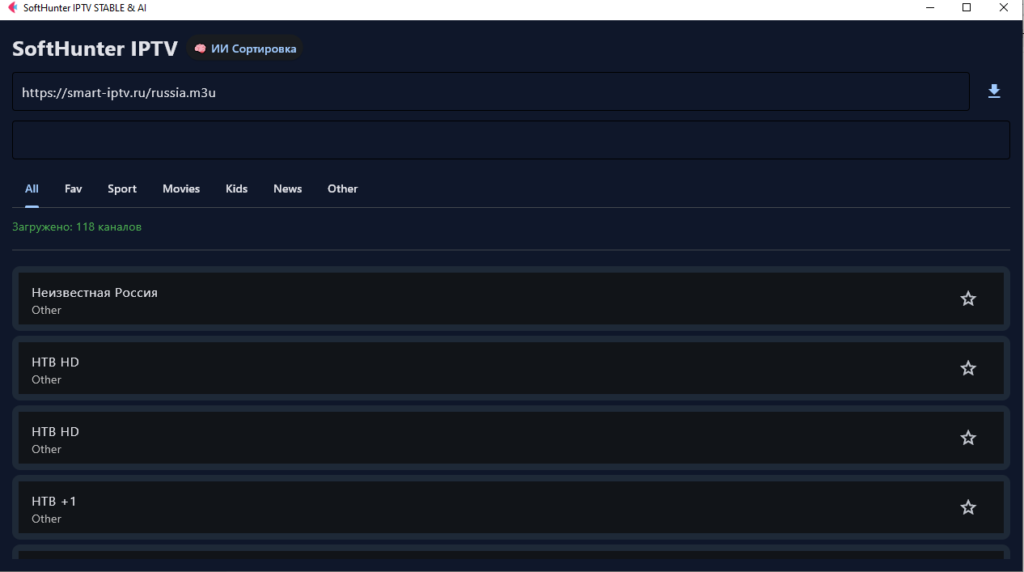
In this tutorial, we are taking a no-nonsense engineering approach. We will build a desktop app with Python Flet, integrate the robust VLC engine for playback, and use the Google Gemini 2.0 Flash API to sort IPTV channels with AI semantically.
🔗 Before we begin: If you are completely new to handling
.m3ufiles, I highly recommend checking out our previous article: [How to Find and Test Reliable M3U Playlists for Your Home Server] to get your media sources ready.
⚠️ Important Security Disclaimer
If you are streaming media via custom M3U playlists, your ISP can monitor your traffic and potentially throttle your bandwidth. Always use a strict no-logs VPN to encrypt your connection and protect your privacy. We highly recommend using [ ExpressVPN / NordVPN] when running custom Python streaming scripts.
1. The Tech Stack: Flet, VLC, and Gemini AI
To build this application, we are moving away from heavy, outdated GUI frameworks. Instead, we will use a modern stack:
- Flet (Flutter for Python): To build a fast, reactive dark-mode UI.
- Python-VLC (Subprocess): The ultimate fallback. Instead of fighting with missing codecs in standard libraries, we will pipe the stream directly to the local VLC executable.
- Google Generative AI API: For semantic channel categorization.
2. Parsing the M3U File (Heuristic Approach)
Before we bring in the AI, we need a solid foundation to read the file. A standard python m3u parser script example usually relies on RegEx or simple string matching.
We will create a basic classification function that looks for obvious keywords like “sport” or “movie”.
Python
def fast_classify(name: str) -> str:
    n = name.lower()
    if "sport" in n or "espn" in n: return "Sport"
    if "movie" in n or "cinema" in n: return "Movies"
    if "kids" in n or "disney" in n: return "Kids"
    if "news" in n or "bbc" in n: return "News"
    return "Other" # The dumping ground for unknown channels
The problem? About 60% of your channels will end up in the “Other” category because their names aren’t obvious (e.g., “HBO”, “Nickelodeon”, or “Sky Action”).
Heuristic Filtering vs. AI Categorization
Here is why relying solely on standard Python string matching fails for IPTV playlists:
| Feature | Basic Python Parsing (if/in) | AI Categorization (Gemini 2.0) |
| Accuracy | Low (Misses abbreviations) | High (Understands context/brands) |
| Speed | Instant | Takes a few seconds (API Call) |
| Multilingual | Poor (Requires manual translation) | Excellent (Native translation) |
| Maintenance | High (Hardcoding new keywords) | Zero (AI adapts automatically) |
3. Universal Playback: Python VLC Subprocess Example
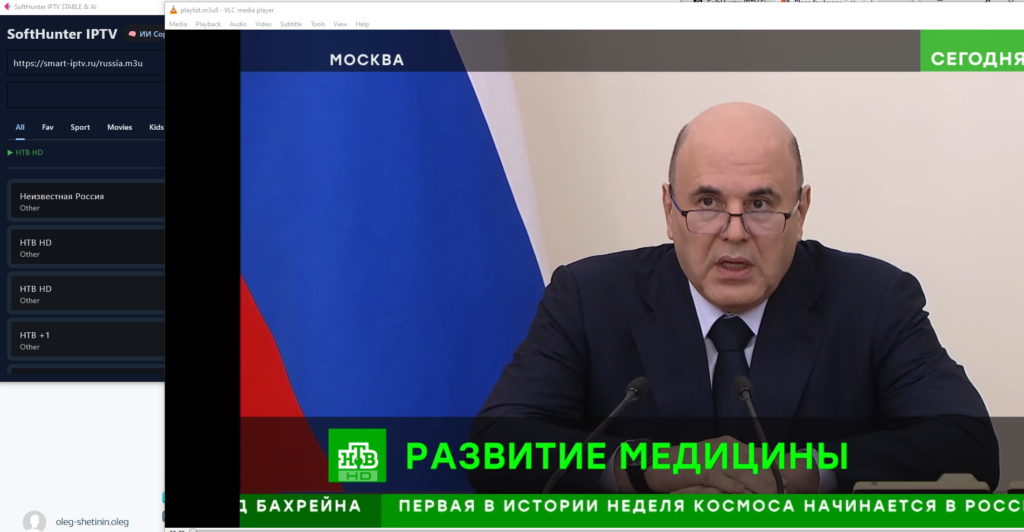
Built-in media players in Python GUI frameworks often crash when handling .ts or unstable .m3u8 IPTV streams. The absolute most reliable way to play a stream is to hand it off to VLC.
Here is a bulletproof python vlc subprocess example that hunts for the VLC executable on a Windows machine and launches the stream without opening a scary command prompt window:
Python
import subprocess
import os

def play_vlc(url: str):
    vlc_paths = [
        r"C:\Program Files\VideoLAN\VLC\vlc.exe",
        r"C:\Program Files (x86)\VideoLAN\VLC\vlc.exe",
        "vlc" # If added to PATH
    ]
    for path in vlc_paths:
        if path == "vlc" or os.path.exists(path):
            # CREATE_NO_WINDOW prevents the black console popup
            subprocess.Popen([path, url], creationflags=subprocess.CREATE_NO_WINDOW)
            return True
    return False
4. The Magic: Use Gemini API to Categorize Data
Now for the brain of the operation. We will take all the channels that our basic parser dumped into the “Other” category and send them to Google’s Gemini AI.
We are using the gemini-2.0-flash model because it is incredibly fast and cheap (often free for small developer workloads). Here is a practical gemini 2.0 flash python api example forcing the AI to return a strict JSON format for easy UI updating.
Python
import google.generativeai as genai
import json
import re

# Insert your API key from Google AI Studio
genai.configure(api_key="YOUR_API_KEY_HERE")

def ai_smart_sort(unknown_channels_list):
    model = genai.GenerativeModel('gemini-2.0-flash')

    prompt = f"""
    You are an AI assistant. Sort this list of TV channels.
    Strictly use these categories: "Sport", "Movies", "Kids", "News".
    If it fits nowhere, output "Other".
    Return ONLY valid JSON. Key = Channel Name, Value = Category.
    Example: {{"Eurosport": "Sport", "HBO": "Movies"}}
    Channels: {unknown_channels_list}
    """

    response = model.generate_content(prompt)

    # Extract JSON safely using RegEx
    match = re.search(r'\{.*\}', response.text, re.DOTALL)
    if match:
        return json.loads(match.group())
    return {}
When the user clicks the “AI Sort” button, the script sends an array of unclassified channel names to Gemini. The AI understands that “Cartoon Network” belongs in “Kids” and “Fox Business” belongs in “News”. It returns the JSON, and our Flet UI updates the channel tabs instantly.
Build iptv Player Python. Final Thoughts: Automate Everything
By combining Flet for the UI, a subprocess call to VLC for rock-solid playback, and the Gemini 2.0 API, we’ve successfully built a tool to automate m3u playlist sorting in Python. You no longer have to scroll through 400+ messy text lines.
Want to run this 24/7?
If you plan to run AI-driven Python scripts like this continuously or build your own media server, a standard laptop won’t cut it. We recommend deploying your projects on a reliable [ DigitalOcean VPS] or investing in a dedicated low-power [Mini PC on Amazon] for your garage or home lab.
Have you tried integrating AI into your media setups? Let me know in the comments below!